
Setting Up Votifier on Your Hytale Server: The Complete Guide

Key Points
Votifier lets your server receive vote notifications from listing sites, which boosts your ranking and helps players find you.
You've got three ways to integrate: basic HyVotifier plugin, our all-in-one HyServers Plugin (recommended), or the REST API for custom setups.
V2 protocol uses simple token auth instead of RSA keys, making setup way easier than the old V1 system.
The HyServers Plugin handles everything in one package including live status updates, vote rewards, review rewards, and multi-server networks.
Voting systems are a core part of building an active server community. Players vote on listing sites, your server climbs the rankings, and you reward them for the support. Simple loop, but getting it working right takes some setup.
This guide covers everything you need to add voting to your Hytale server using HyServers.gg. We'll walk through the different methods, recommend the best approach for most servers, and help you avoid the common pitfalls.
Why Votifier Matters for Your Server
Votes are currency on server listing sites. Every vote bumps your server higher in the rankings, which means more visibility and more players discovering your community. But getting the technical side working can be confusing if you've never set up Votifier before.
Here's the basic concept: when someone votes for your server on HyServers (or any other listing site), that site sends a notification to your game server. Your server receives it, knows who voted, and can reward that player automatically. It creates a feedback loop that keeps players engaged and coming back.
Understanding Protocol Versions
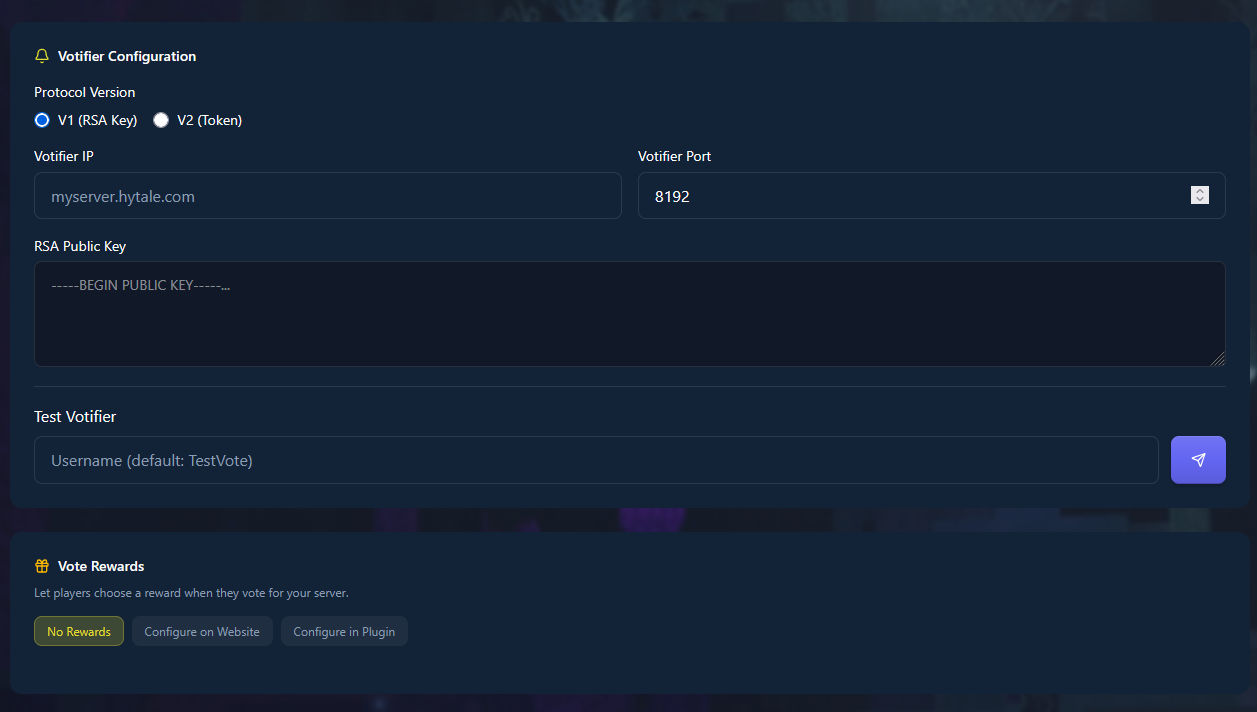
Votifier comes in two flavors. V1 uses RSA public key encryption, which means generating key pairs and pasting long strings of characters into config files. It works, but it's kind of a pain.
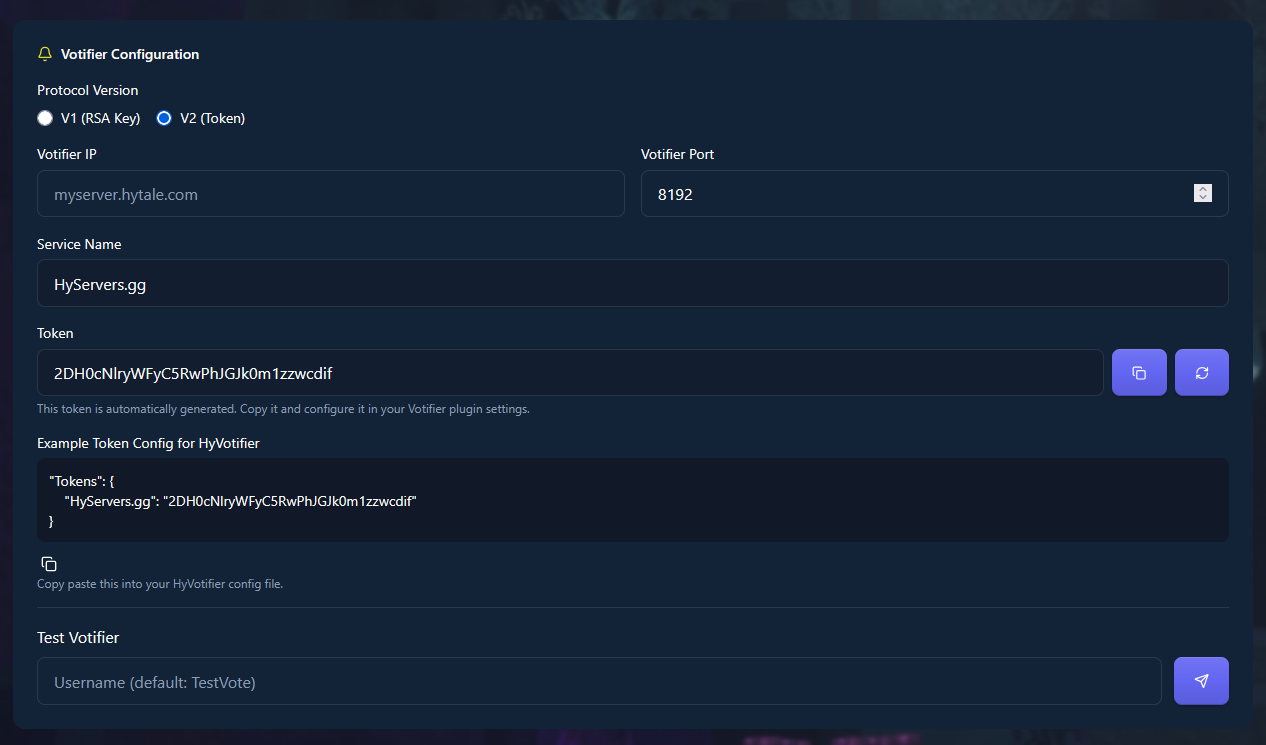
V2 switched to token-based authentication. You copy a token from the listing site, paste it into your server config, done. Much cleaner for new setups. Both versions do the same job, V2 just removes some friction.
Three Ways to Integrate
HyServers gives you options depending on what you need:
Standard HyVotifier Plugin
This is the basic implementation. Install the plugin, configure your protocol version, and your server will receive vote notifications. Nothing fancy, just the core functionality. Good if you want to handle rewards through a different system or don't need the extra features.
Download it from CurseForge and drop it in your mods folder.
HyServers Plugin (Our Pick)
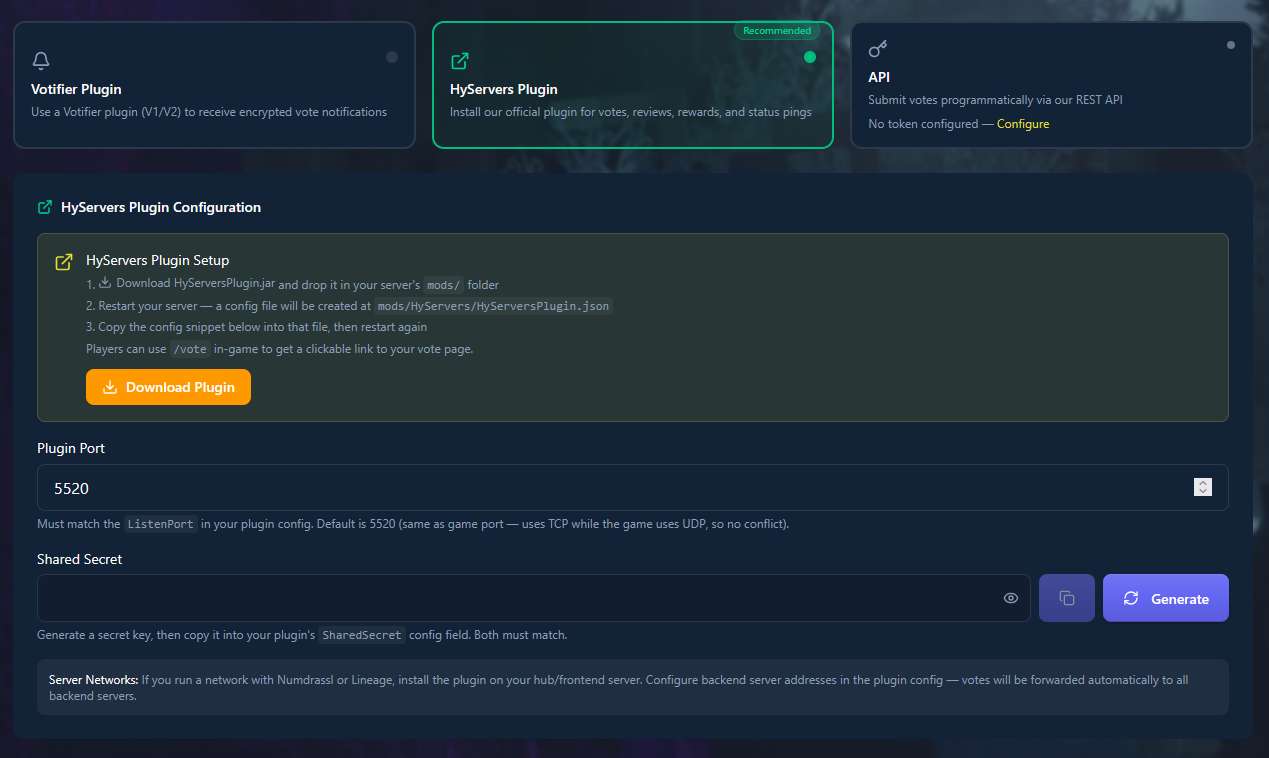
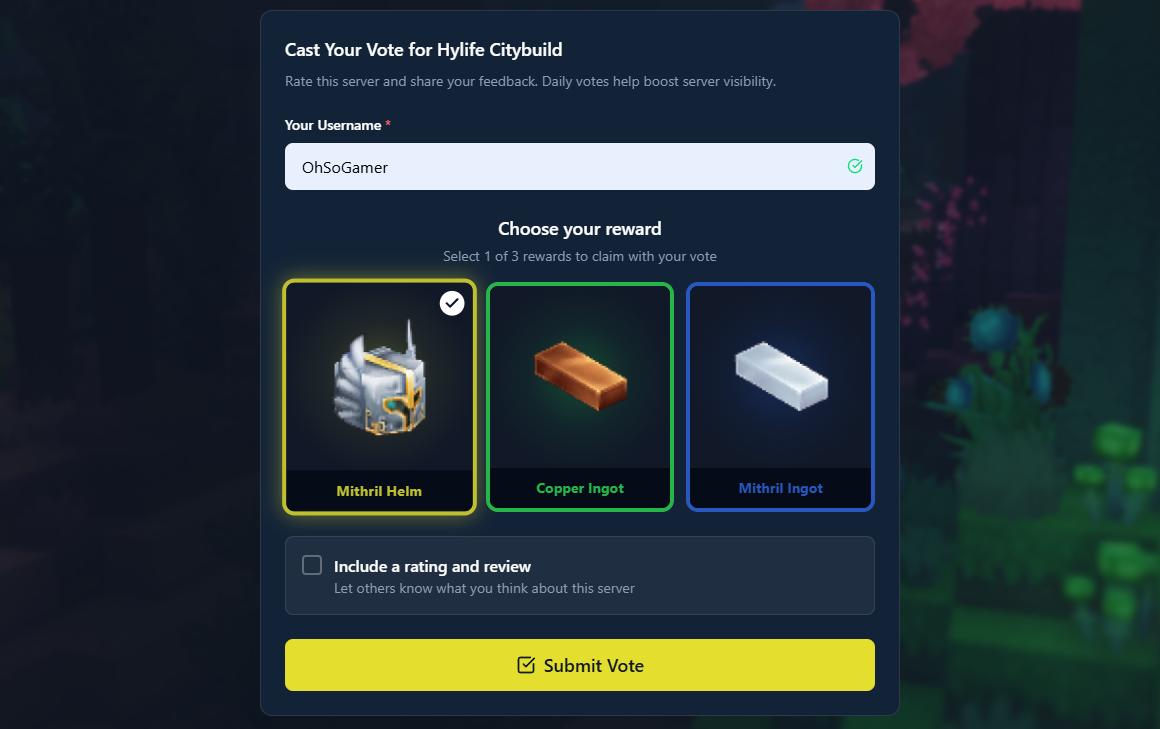
We built this to handle everything in one package. Vote notifications, yes, but also live status pings so your server info stays current on the site. Players can use /vote in-game to get their personalized voting link. You can set up reward commands that run automatically. Players can even choose their reward from options you configure on the website before they vote, which is great for engagement.
Multi-server networks? The plugin forwards votes from your hub to backend servers automatically. No manual configuration needed.
You'll find the download link in your server dashboard on HyServers once you add your server.
REST API
Building something custom? The REST API lets you receive vote notifications programmatically. This is for developers who want full control over how votes are processed and recorded.
Setting Up Standard HyVotifier
Grab the HyVotifier plugin from CurseForge. Put the .jar file in your server's mods folder and restart. The plugin will generate its config files on first launch.
Log into your HyServers dashboard and find the Votifier settings section. You'll see options for V1 and V2. Pick your version.
For V1 Setup
Open the plugin's config file and locate your RSA public key. Copy the entire key (it's a big block of text starting with BEGIN PUBLIC KEY). Paste it into the V1 field on your HyServers dashboard.
For V2 Setup
Copy the token from your HyServers dashboard. In your plugin config, find the Tokens section and add a new entry. The service name must be exactly HyServers.gg with proper capitalization. Paste your token there.
Save everything and use the Test Votifier button on your dashboard to send a test vote. Check your server console. You should see a message confirming the vote was received.
Setting Up the HyServers Plugin
Download HyServersPlugin.jar from your server dashboard. Drop it in the mods folder, restart your server. The plugin creates its config at mods/HyServers/HyServersPlugin.json.
Back in your dashboard, generate a SharedSecret. This is basically a password that authenticates your server. Copy it and paste it into your plugin config.
The default port is 5520 TCP. Your game server uses 5520 UDP, so there's no conflict. They're different protocols on the same port number. If you need a different port, change it in both the plugin config and your dashboard settings.
Once configured, the plugin starts sending live status updates automatically. Your player count, MOTD, and online status stay current on HyServers without any manual updates. Players can type /vote in-game to get their voting link.
Configuring Vote Rewards
The HyServers Plugin gives you three options for handling rewards:
No Rewards
Votes still count for your ranking. Some servers prefer to handle rewards through other systems or don't offer them at all. That's fine.
Configure on Website
This is where it gets interesting. Set up multiple reward options on your dashboard (give items, currency, rank upgrades, whatever). When a player votes, they see those options and pick one before voting. Creates more engagement than a fixed reward.
Configure in Plugin
Define VoteCommands and ReviewCommands directly in your config file. Use {player} as a placeholder for the voter's username. The plugin runs these commands automatically when someone votes.
Example: /give {player} diamond 5 would give 5 diamonds to whoever just voted.
Server Networks and Vote Forwarding
Running multiple servers? Votes need to reach the right one.
With the HyServers Plugin, install it on your hub server. List your backend servers in the config. When a player votes while connected to a backend, the vote forwards there automatically. Simple.
Standard HyVotifier has built-in forwarding too. Configure ForwardingSettings with your backend server addresses, ports, and a ForwardingSecret. Each backend needs its own port number. Those ports only need to be reachable from your main server, not publicly accessible.
Hosting Provider Tips
Port configuration varies by host:
Nitrado: Your Votifier port is usually your game port plus 3. Game on 5520 means Votifier on 5523.
Self-hosted or VPS: Open the port in your firewall. On Ubuntu/Debian with ufw:
sudo ufw allow 8192/tcp(or whatever port you chose).Pterodactyl or similar: Allocate an additional port in your control panel, then use that port in your Votifier config.
Common Issues and Fixes
Vote not working? Start here:
Check if the port is actually open. Your hosting provider might block it by default.
For V2, the token service name in your config must match exactly. HyServers.gg with that exact capitalization, not "hyservers" or "HyServers".
Reward commands with
{player}only work when that player is online. Offline rewards need a different approach (like storing them in a database).Always check your server console after a test vote. Error messages tell you what went wrong.
More Resources
This covers the essentials, but there's more depth in our full Votifier setup guide. The HyServers Plugin page has complete config documentation. Building something custom? Check the API docs.
Getting votes set up takes maybe 15 minutes once you understand the pieces. The ranking boost alone makes it worth the effort, and automated rewards keep your community active. Pick the integration method that fits your setup and get it running.